
Ask AI
Why trust Silicon Reef as your Microsoft 365 Copilot partner? Ask AI


Microsoft 365 Copilot & AI Services
Tailored Microsoft 365 Copilot Implementation
Our Services
Get clarity on how Microsoft 365 Copilot can best serve your organisation. We work with your teams to define where Copilot adds the most value and outline a clear plan to make it happen.
Find the Real Opportunities
We start by understanding your goals, processes, and pain points to identify where Copilot can remove friction and support meaningful change.
Build the Plan
Our team maps the most relevant Copilot applications and data connections, turning ambition into a practical, step-by-step strategy.
Focus by Function
From finance to HR and operations, we create tailored Copilot strategies so each department benefits in measurable, everyday ways.
Lay the groundwork for effective Copilot use with a clean, compliant, and well-organised data environment. With a focus on SharePoint, we optimise content structure and permissions so AI-powered tools like SharePoint Knowledge Agent surface reliable information where it’s needed most.
Prepare Your Data
We assess, clean, and structure data across SharePoint and Microsoft 365 so that Copilot can return relevant, dependable insights.
Protect and Govern
Our approach ensures that your data is managed responsibly—meeting compliance, security, and governance standards.
Drive Confident Use
With structured, trusted data in place, your teams can rely on Copilot for quality results that support everyday decision-making.
Help your teams grow confident using Copilot tools across the Microsoft 365 suite, including SharePoint, Outlook, Excel, and others. We focus on practical support and guidance that integrates AI capabilities into everyday workflows.
Empower with Real-World Tools
We introduce employees to the Copilot tools built into Microsoft 365—like SharePoint Knowledge Agent—helping them use these tools effectively to find information, streamline tasks, and improve collaboration.
Make AI Relevant to Roles
Training sessions and guidance are customised to your organisation’s workflows and knowledge needs, showing how Copilot enhances productivity and access to trusted company insights.
Support Every Step
We provide ongoing support to ensure smooth adoption, helping employees build confidence and incorporate AI tools naturally into their daily work routines.
Get Started Quickly
Getting started with Microsoft 365 Copilot doesn’t have to mean committing to a major programme from day one. Our fixed-price, fixed-outcome packages are designed to help you take the next step with confidence, whether that’s identifying high-value use cases, assessing readiness, or planning your rollout. Each engagement delivers a tangible outcome of its own, while laying the groundwork for long-term success with Copilot.

Copilot Discovery & Blueprint
Microsoft 365 Copilot Readiness & Deployment

Looking for Agents?
Leaders Trust Silicon Reef


















Our People-First Approach
Our Microsoft 365 Copilot services focus on making AI genuinely useful in everyday work, not just available in the toolbar. We help you find the right use cases, prepare your data, and support your people so Copilot feels like a helpful teammate rather than a risky experiment.
Thorough Discovery & Co‑Creation of Use Cases – We start by listening to your teams and mapping the tasks that drain time or require repetitive effort, then co‑create a Copilot roadmap that targets high‑value scenarios.
Secure Data Readiness & Human-Centred AI Governance – We prepare and structure your Microsoft 365 data so Copilot has a reliable foundation, then put clear guardrails in place so people know what it can see, how it’s using their content, and where the boundaries are.
Personalised Rollout by Role & Real‑World Relevance – We tailor Copilot usage and guidance for different departments and roles, showing each group concrete ways it can make their work easier so AI feels directly relevant to what they do.
Comprehensive Training & Change Management – We support rollout with clear messaging, live demos, and role‑based training, building confidence in how to use Copilot well and helping early adopters become champions for others.
Continuous Improvement & Human Feedback Loops – We track usage, gather feedback, and refine use cases over time, sharing new patterns and best practices so Copilot keeps delivering more value as your people and organisation learn what works best.
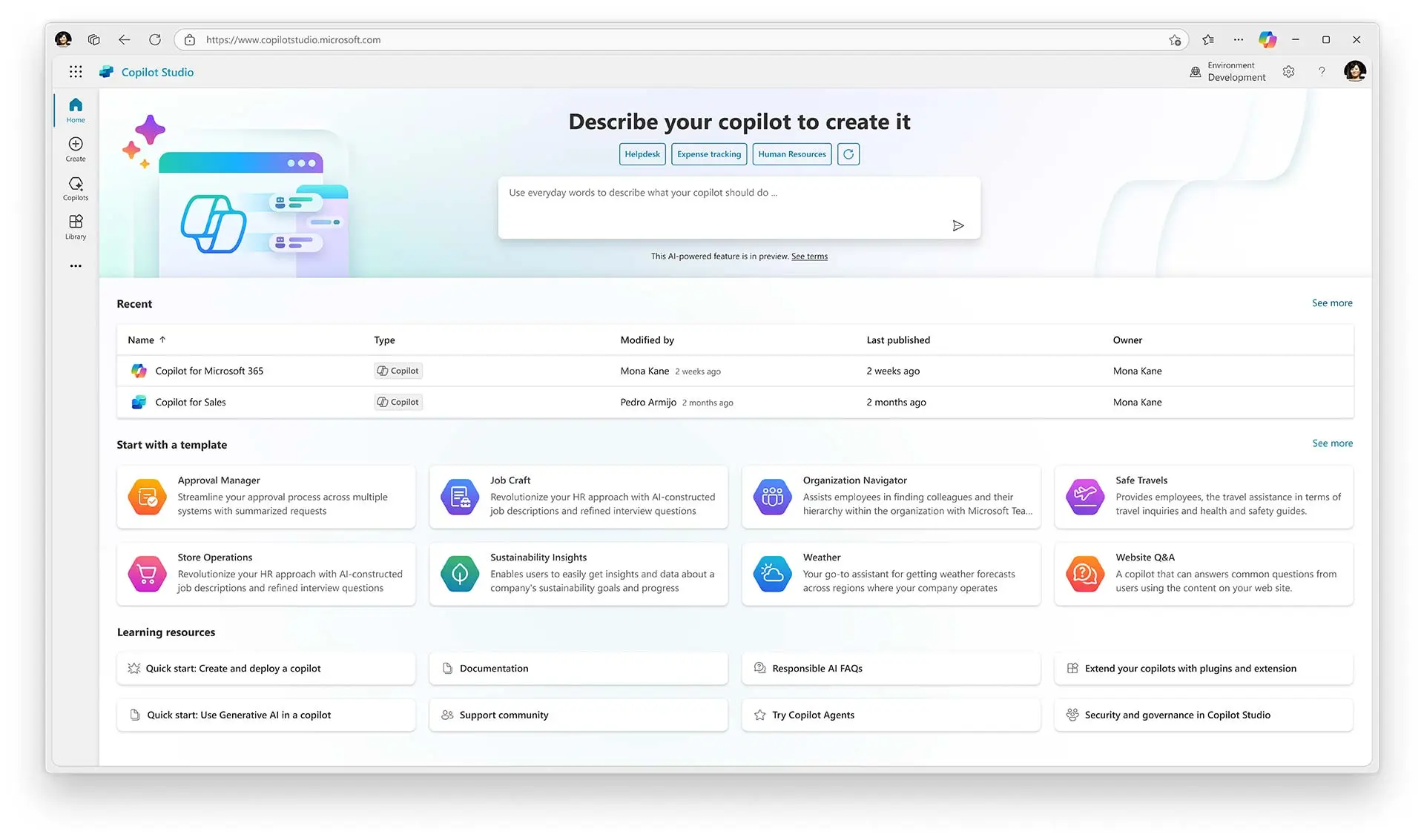
Quick Wins with Copilot Agents
Not ready for a full AI transformation? We also help you deliver quick value with Copilot Agents—custom AI assistants designed to tackle specific tasks and workflows.
Unlike organisation-wide Copilot, Agents focus on targeted challenges—automating approvals, surfacing policy information, or connecting disparate systems. They let you prove AI value fast, without overhauling your entire data estate first.
Whether you need to streamline HR processes, improve internal communications, or automate routine tasks, Copilot Agents offer a practical starting point that delivers measurable impact quickly.
Microsoft 365 Copilot — Your Personal Productivity Assistant
Think of Copilot as your virtual colleague, seamlessly integrated across your Microsoft 365 tools. It helps you get more done in less time by automating routine tasks and providing instant insights, so you can focus on what truly matters—your work.
Universal Use Cases for Every Role
Summarising Meeting Notes
Data Analysis & Insights
Searching for Files & Information
Drafting & Editing Documents
Organising Project Work
Providing Contextual Recommendations
Put Microsoft 365 Copilot to the Test

Recap a Meeting
Let Copilot keep track of key topics and actions items so you can stay focused during thr meeting and avoid listening to the recording after.
→ Draft an email with roles and action items from meeting.

Summarise an Email Thread
Get quickly caught up to a long, complex email thread.
→ Click on the ‘summarise’ icon.
Draft Email
Personalise the tone and length.
→ Draft an email to [Name] that informs them that Project ‘X’ is delayed by two weeks. Make it short and casual in tone.

Tell Me About a Project
Provide insights and analysis from across multiple sources to get up to speed quickly.
→ Tell me what’s new about [Specific Project], organised by emails, chats and files.
Give Me Some Ideas For...
Boost your creativity with ideas for your work, such as agendas, product names, social media posts, etc.
→ Suggest 10 compelling taglines based on file.
Help Me Write...
Jumpstart creativity and write and edit like a pro by getting a first draft in seconds.
→ Generate three ways to say ‘X’.

How Do I...
Let Copilot help you build and / or fix formulas in Excel.
→ How do I sum values that are greater than 0?
Translate a Message
With Business becoming increasingly international, it’s important to be able to read or write messages in other languages.
→ Translate the following text into French, ‘[Insert Text]’.
What Did They Say?
When you vaguely remember someone mentioning a topic, have Copilot do the research for you.
→ What did [Insert Person’s Name] say about ‘Specific Topic’.
Looking for inspiration?
We’ve got you covered. Our blogs, guides and how-tos help you get started with Microsoft 365 Copilot.
The AI Returns You’ll See in 2027 Are Being Decided Right Now
The decisions you make about your AI strategy today will impact your returns over the next 12-18 months – and it all comes back to governance.
Governance & Security Foundations: 5 Ways to Prepare for Microsoft 365 Copilot
Learn key strategies to enhance your organization’s data security and governance with Microsoft 365 Copilot, ensuring a secure and productive AI integration
Microsoft Copilot: Why SharePoint Data Hygiene Should be Top Priority
See why maintaining good SharePoint data hygiene is crucial for leveraging Microsoft Copilot effectively and avoiding potential data governance issues.
How to Use Microsoft 365 Copilot for Employee Listening
Learn how M365 Copilot can revolutionise your employee listening strategy and save you hours of time.
FAQs
Got questions? We’ve answered some of the common ones here. If you can’t find what you’re looking for, drop us a note.
What is Microsoft 365 Copilot and how can it benefit my organisation?
Microsoft 365 Copilot is an AI-powered assistant designed to enhance productivity and collaboration within your organisation.
By automating routine and repetitive tasks, Copilot allows employees to focus on more creative and impactful work. It can help with scheduling meetings, drafting emails, generating reports, and managing data, among other tasks. This not only saves time but also reduces the cognitive load on employees, leading to increased efficiency and job satisfaction.
Additionally, Copilot’s integration with Microsoft 365 tools ensures a seamless workflow, making it easier for teams to collaborate and achieve their goals.
How does Microsoft Copilot integrate with our existing Microsoft 365 tools?
Microsoft 365 Copilot integrates seamlessly with the suite of Microsoft 365 applications, including Word, Excel, Teams, and Outlook. This integration allows Copilot to provide contextual assistance within these tools, automating tasks and offering suggestions based on the employee’s activities.
For example, in Word, Copilot can help draft documents or generate summaries, while in Excel, it can assist with data analysis and visualisation. In Teams, Copilot can schedule meetings, manage tasks, and facilitate communication. This deep integration ensures that Copilot enhances the functionality of the tools your team already uses, making workflows more efficient and cohesive.
What types of tasks can Microsoft Copilot automate?
Microsoft 365 Copilot can automate a wide range of tasks to streamline workflows and save time. These tasks include scheduling meetings, drafting and sending emails, generating reports, and managing data.
In Word, Copilot can help with document creation, editing, and summarisation. In Excel, it can assist with data entry, analysis, and visualisation. In Teams, Copilot can manage tasks, facilitate communication, and schedule meetings. By automating these routine tasks, Copilot allows employees to focus on more strategic and creative work, enhancing overall productivity and job satisfaction.
Is Microsoft Copilot secure and compliant with data privacy regulations?
Yes, Microsoft 365 Copilot is built with robust security and compliance features to ensure that your data is protected. Microsoft employs advanced security measures, including encryption, access controls, and threat detection, to safeguard your information.
Additionally, Copilot adheres to relevant data privacy regulations, such as GDPR and CCPA, ensuring that your organisation remains compliant. Microsoft also provides transparency regarding data usage and offers tools for managing data privacy settings.
With these security and compliance measures in place, you can trust that Microsoft 365 Copilot will protect your data while enhancing productivity and collaboration within your organisation.
What's the difference between Copilot Chat and Microsoft 365 Copilot?
Copilot Chat and Microsoft 365 Copilot are both AI-powered tools designed to enhance productivity, but they serve different purposes.
Microsoft 365 Copilot integrates directly with Microsoft 365 applications like Word, Excel, Teams, and Outlook, providing contextual assistance and automating tasks within these tools. It helps with drafting documents, generating reports, scheduling meetings, and more, all within the familiar Microsoft 365 environment.
On the other hand, Copilot Chat is a conversational AI tool that allows users to interact with the system through natural language queries. It can answer questions, provide information, and assist with tasks based on user input.
While Microsoft 365 Copilot focuses on enhancing specific application functionalities, Copilot Chat offers a broader range of conversational interactions, making it a versatile tool for various inquiries and support needs.
Send us a message
We help organisations of all shapes and sizes elevate their digital employee experience with Microsoft 365 — from intranets and document management to workflow automation and AI. Tell us about your goals, and we’ll help you get there.