
Why work with Silicon Reef on your Copilot Agents? Ask AI


Copilot Agents Services
Fast-Track AI Value with Copilot Agents
Not ready to clean up your entire Microsoft 365 environment? Copilot Agents offer a practical starting point. By focusing AI on specific tasks, departments, or workflows, you can deliver measurable impact quickly – without needing to perfect your data estate first.
We help you identify high-value use cases, build tailored agents, and deploy them where they’ll make the biggest difference. It’s a focused, pragmatic approach to AI that gets results while you work on broader digital transformation goals.
Our Services
- Discovery & Strategy
- Agent Build & Data Integration
- Agent Governance & Optimisation
- Training & Rollout
- Copilot Agents for SharePoint Intranets
Pinpoint where Copilot Agents can solve real problems in your organisation. We work closely with your teams to identify the business areas, processes, and pain points where a custom agent will deliver the greatest impact.
Identify the Right Opportunities
We analyse your workflows and challenges to find where an agent can automate tasks, improve decision-making, or connect fragmented systems.
Define Clear Objectives
Together, we set specific goals and scope for each agent—ensuring it’s designed to address genuine business needs, not just proof-of-concept experimentation.
Focus on High-Value Processes
From customer support to compliance tracking, we prioritise the processes that benefit most from intelligent automation and tailored AI assistance.
Turn your strategy into a working solution. We handle the technical heavy lifting—preparing your data, configuring integrations, and building agents that fit seamlessly into your existing Microsoft 365 environment.
Prepare Your Data
We assess and structure the datasets your agent needs, ensuring it can access accurate, relevant information without requiring a full estate overhaul.
Build and Configure
Our team designs and develops your agent using tools like Microsoft Copilot Studio, Azure AI Foundry and Power Platform, tailoring its capabilities to your specific use case and user needs.
Integrate with Existing Systems
We connect your agent to the tools and data sources your teams already use—including SharePoint and third-party platforms—for smooth, reliable operation.
Keep your Copilot Agents running smoothly, securely, and delivering ongoing value. We help you establish governance frameworks, monitor performance, and evolve your agents as your business needs change.
Establish Governance Standards
We work with you to define clear ownership, usage policies, and security protocols for your agents—ensuring they operate within your organisation’s compliance and data governance requirements. Using tools like the Copilot Control System (CCS), we help you maintain visibility and control across all your AI deployments.
Monitor and Measure Performance
Track how your agents are being used, identify adoption patterns, and measure their impact on productivity and efficiency through regular reporting and analytics.
Iterate and Scale
As your needs evolve, we help you refine existing agents, expand their capabilities, and identify opportunities to deploy new agents across additional departments or workflows for greater organisational benefit.
Get your teams confident and capable with their new AI assistant. We provide practical training, ongoing support, and iterative improvements to ensure your agent becomes an embedded, valuable part of daily work.
Empower Your People
We run hands-on sessions that show employees how to interact with the agent, what it can do, and how it fits into their day-to-day tasks.
Support Through Adoption
Our team provides ongoing guidance as users get familiar with the agent, addressing questions and refining the experience based on real feedback.
Iterate and Improve
Agents aren’t set-and-forget. We help you track performance, gather insights, and continuously improve the agent’s capabilities to deliver lasting value.
We start from where your intranet is today – its information architecture, content and pain points – and identify where agents can make the biggest impact without needing a full‑scale rebuild. Whether you’re launching a new SharePoint intranet or enhancing an existing one, we design and build Copilot agents that sit naturally within Microsoft 365 and reflect how your organisation actually works.
Intranet-Focused Copilot Agents
Use Copilot agents to make your intranet the first place people go for answers. From policy and HR questions to IT support and internal comms, we create agents that understand your content, respect permissions and respond in plain, human language.
Designing Agents Around Real Roles
Different teams need different types of support, so we avoid one‑size‑fits‑all. We work with internal comms, HR, IT, frontline and line‑of‑business teams to define role‑specific use cases, then design agents that reduce repetitive queries and guide people through everyday tasks.
From Use Case to Intelligent Intranet
We help you prioritise intranet use cases, map the knowledge your agents rely on and turn that into working Copilot agents using Microsoft tools. You get a phased, practical roadmap that delivers quick wins while building towards a truly intelligent intranet.
Get Started Quickly
Get off the ground with Copilot Agents quickly. Our fixed-cost, fixed-outcome services are designed to help you get moving in just a few weeks.
Copilot Agents Accelerator
Find your highest-value agents, and take them from idea to production-ready build with governance baked in from the start.
Leaders Trust Silicon Reef


















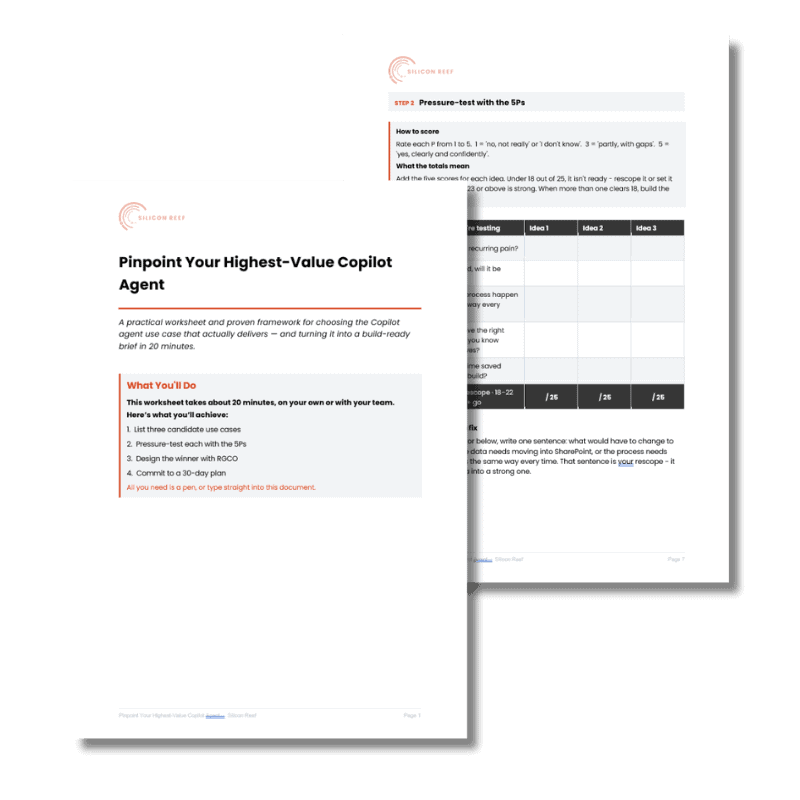
Practical Worksheet
Pinpoint your highest-value Copilot agent
A practical worksheet to find what’s worth building — and shape it fast
Most teams don’t struggle with Copilot but choosing what to build and where to start. This free 20-minute worksheet helps you pinpoint one high-value use case and turn it into something you could actually deliver.
Our People-First Approach
Our Copilot Agent services use the same people‑first mindset as the rest of our Microsoft 365 work – we design agents around real tasks, real teams, and clear guardrails, so they feel like trusted helpers rather than experimental bots.
Thorough Discovery & Co‑Creation of Use Cases – We work with your teams to uncover bottlenecks and co‑design high‑impact agent scenarios that will improve day‑to‑day work.
Seamless Integration & Human‑Centred Design – We embed agents in tools people already use and shape their tone and behaviour to match your culture, so interactions feel natural and low‑friction.
Trusted Knowledge & Responsible AI Governance – We prepare the content agents draw from and align them with your permissions and policies, so answers are useful, appropriate, and secure.
Employee Adoption, Training & Support – We pair launch with clear messaging, practical training, and champions, helping people understand when to use agents and feel confident doing so.
Tailored Solutions & Continuous Optimisation – We configure each agent to fit your processes, then refine prompts and logic over time using feedback and usage insights.
A Copilot Agent with Every Intranet
AI is so much more than drafting content or summarising meeting notes. Done well, Copilot agents can fundamentally change how your intranet works – and how employees use it day to day. That’s why we’re committing to include a Copilot agent with every intranet we deliver.
Whether you’re creating a new intranet or enhancing what you already have, we’ll help you pinpoint high‑value agent use cases and turn Copilot into a practical, intelligent assistant built around your organisation.
Copilot Agent Examples & Use Cases
These examples illustrate just a few of the ways Copilot Agents can transform your workflows and tackle everyday business challenges. Every organisation has unique needs, and the possibilities for custom agents are virtually limitless—whether you’re automating approvals, connecting disparate systems, or surfacing insights buried in your data.
Use these as inspiration for what’s possible in your own context.
AI Intranets, Made Real
Watch the session for practical use cases and a live demo showing how agents turn a static intranet into a space where employees self‑serve answers and get work done.

Looking for inspiration?
We’ve got you covered. Our blogs, guides and how-tos help you get started with Microsoft 365 Copilot.
AI Readiness: Where Universities Get Stuck
Why strategy and people matter more than tools — and how Microsoft 365 becomes valuable when shaped intentionally.
AI Community Agents: When Conversation Becomes Organisational Knowledge
Microsoft’s new AI community agents in Viva Engage help internal communicators turn everyday questions and discussions into trusted, reusable knowledge — at scale and without losing the human touch.
What Does an AI-Powered Intranet Really Mean?
We look at practical examples of how Copilot agents can level up your SharePoint intranet.
Microsoft 365 Copilot Agents: Your New Digital Teammates
We look at Microsoft’s 13 AI agents that are available with your M365 Copilot licence – what they are, why they matter and practical use cases.
The Power of Design Thinking & Microsoft Copilot
In our on-demand webinar, learn how Microsoft Copilot can be your personal productivity assistant, saving you time across everything from ideation to data analysis.
Governance & Security Foundations: 5 Ways to Prepare for Microsoft 365 Copilot
Learn key strategies to enhance your organisation’s data security and governance with Microsoft 365 Copilot, ensuring a secure and productive AI integration
Microsoft Copilot: Why SharePoint Data Hygiene Should be Top Priority
See why maintaining good SharePoint data hygiene is crucial for leveraging Microsoft Copilot effectively and avoiding potential data governance issues.
How to Use Microsoft 365 Copilot for Employee Listening
Learn how M365 Copilot can revolutionise your employee listening strategy and save you hours of time.
FAQs
Got questions? We’ve answered some of the common ones here. If you can’t find what you’re looking for, drop us a note.
What are Microsoft 365 Copilot Agents?
Microsoft 365 Copilot Agents are specialised AI assistants designed to automate specific business tasks and workflows within your organisation. Unlike general-purpose Microsoft 365 Copilot, which provides AI assistance across all your Microsoft apps, Copilot Agents are custom-built to address particular challenges—such as processing applications, analysing data, or managing policies. These agents can retrieve information from multiple sources, complete multi-step tasks autonomously, and integrate with both Microsoft 365 and third-party systems.
Silicon Reef helps organisations identify high-value use cases, build tailored agents using Microsoft Copilot Studio, and deploy them where they’ll deliver the greatest impact—without requiring a complete overhaul of your data environment.
What's the difference between Microsoft 365 Copilot and Copilot Agents?
Microsoft 365 Copilot is your personal AI productivity assistant embedded across Teams, Outlook, Word, Excel, and other Microsoft apps, helping you with everyday tasks like summarising meetings or drafting emails.
Copilot Agents, by contrast, are purpose-built AI tools that focus on specific business processes or departmental workflows. While Copilot responds to your prompts and helps you work faster, Copilot Agents can work autonomously in the background—monitoring events, executing tasks, and completing complex workflows without continuous human input.
Silicon Reef works with organisations to determine when a general Copilot implementation meets their needs, and when building custom Copilot Agents will deliver greater operational value and efficiency gains.
Do I need to clean up my entire Microsoft 365 environment before building Copilot Agents?
No, you don’t need to perfect your entire Microsoft 365 data estate before creating Copilot Agents. Agents offer a practical way to gain AI value quickly by focusing on specific datasets, systems, or processes relevant to the task at hand. This targeted approach means you can deliver measurable business impact whilst working on broader data governance and hygiene initiatives in parallel.
Silicon Reef helps organisations identify which data sources and integrations are essential for each agent, preparing only what’s necessary to get your agent operational and delivering results—making AI adoption faster and more pragmatic.
How much do Copilot Agents cost?
Copilot Agents are built using Microsoft Copilot Studio, which offers different pricing models depending on your needs. If you already have Microsoft 365 Copilot licences, using agents within Microsoft 365 apps like Teams or SharePoint is included in your existing subscription. For standalone agent deployments, Microsoft offers usage-based pricing starting at approximately £0.01 per message processed, or message packs at around £158 per month for 25,000 messages.
Silicon Reef provides transparent guidance on licensing, helps you estimate usage based on your specific use cases, and ensures you choose the most cost-effective deployment model for your organisation’s requirements.
How long does it take to build and deploy a Copilot Agent?
The timeline for building and deploying a Copilot Agent varies depending on complexity, required integrations, and data readiness. Simple agents focused on retrieving information or answering FAQs can often be built and deployed within 2-4 weeks. More complex agents that automate multi-step workflows, connect to multiple systems, or require custom integrations may take 6-12 weeks.
Silicon Reef follows a phased approach—starting with discovery and strategy, moving to agent build and data integration, then finishing with training and rollout support. This structured methodology ensures your agent is fit for purpose, tested thoroughly, and adopted successfully by your teams.
Send us a message
We help organisations of all shapes and sizes elevate their digital employee experience with Microsoft 365 — from intranets and document management to workflow automation and AI. Tell us about your goals, and we’ll help you get there.