
Key Takeaways
- Microsoft Viva is a collection of employee experience applications within Microsoft 365, covering communication, communities, employee listening, workplace insights and learning.
- For internal communicators, the three most relevant applications are usually Viva Connections, Viva Engage and Viva Amplify.
- Viva is designed to work alongside SharePoint, Teams and Outlook, adding useful communication and employee experience capabilities to the tools people already use.
- The strongest Viva experiences are built around real employee needs, such as making information easier to find, creating space for conversation and coordinating communications across different channels.
When Microsoft Viva first launched in 2021, it was described as an employee experience platform for a rapidly changing world of work.
Five years later, many organisations are still trying to work out what that means in practice.
Is Viva an intranet? Is it part of Teams? Is it a social network? Is it one product, or several? And if your organisation already uses SharePoint and Microsoft Teams, what exactly does Viva add? These are the questions we see at Silicon Reef all the time.
The short answer is that Microsoft Viva is a collection of applications within Microsoft 365. Each one supports a different part of the employee experience, from internal communications and communities to employee listening, workplace insights and learning.
For internal comms teams, Viva Connections, Viva Engage and Viva Amplify are usually the most relevant parts of that collection. Connections gives employees a front door to company information and workplace tools. Engage provides space for communities and conversation. Amplify helps communicators plan, publish and measure campaigns across Microsoft 365.
These applications do different jobs, but they’re designed to work together. They also connect with the Microsoft tools employees are already using, including SharePoint, Teams and Outlook.
That is the central idea behind Viva. It shouldn’t feel like a separate platform employees have to remember to visit. Done well, it becomes an additional layer across your digital workplace, making existing content, conversations and tools easier to reach and use.
Jump to:
- What is Microsoft Viva?
- The Main Microsoft Viva Applications at a Glance
- Microsoft Viva as Part of Your Existing Digital Workplace
- How Does Microsoft Viva Support Internal Communications?
- Viva Connections: Bringing Your Digital Workplace Into Teams
- Viva Engage: Creating Space for Conversation & Community
- Viva Amplify: Managing Communications as Campaigns
- How Viva Connections, Engage & Amplify Work Together
- Other Microsoft Viva Apps
- Does Microsoft Viva Replace Your SharePoint Intranet?
- Creating a Useful Microsoft Viva Experience
What is Microsoft Viva?
At its simplest, Microsoft Viva is a collection of employee experience applications built into Microsoft 365.
The easiest way to understand it is to look at the practical challenges each application is designed to address.
If you want to make your SharePoint intranet, company news and everyday workplace tools easier to access, that’s where Viva Connections comes in.
If you want employees to join communities, ask questions, share knowledge and have more open conversations with leaders and colleagues, that’s the role of Viva Engage.
If your internal comms team needs a more organised way to plan, publish and measure communications across several Microsoft 365 channels, Viva Amplify is your answer.
Other Viva applications focus on employee feedback, working patterns and learning. Together, they cover several different aspects of working life, rather than providing one single employee-facing destination.
This’s why Viva can sometimes feel difficult to explain. The name describes a family of applications rather than one specific product. An organisation might use Connections extensively without using Glint, or introduce Engage and Amplify as part of its internal comms strategy without rolling out every other Viva application.
You don’t have to approach Viva as an all-or-nothing platform. The more useful question is which parts could improve your existing digital workplace and solve a genuine communication or employee experience challenge.
The Main Microsoft Viva Applications at a Glance
| Application | What it is | What it can help you do |
|---|---|---|
| Viva Connections | A personalised company homepage and gateway to workplace news, resources and tools | Bring your SharePoint intranet into Teams, surface relevant news and give employees quicker access to common actions |
| Viva Engage | Microsoft’s enterprise social network and community platform | Create communities, support two-way communication, connect employees with leaders and make shared knowledge easier to discover |
| Viva Amplify | An internal communications campaign management application | Plan campaigns, collaborate on content, publish across Microsoft 365 channels and review campaign performance |
| Viva Glint | An organisation-wide employee listening application | Run employee surveys, understand feedback and help leaders and identify areas that need attention |
| Viva Insights | A workplace insights application | Help individuals and organisations understand working patterns, collaboration, productivity and wellbeing |
| Viva Learning | A central place for workplace learning | Bring learning content from different sources into Teams and make it easier to discover, share and recommend |
That gives you the product answer. The more important question for an internal comms team is how those applications fit into the experience employees already have.
See What Microsoft Viva Looks Like in Practice
Silicon Reef’s no-cost Art of the Possible session explores how Viva comes together with SharePoint, Teams and Copilot to create the ultimate comms-friendly digital workplace.
Microsoft Viva as Part of Your Existing Digital Workplace
One of the biggest misconceptions about Viva is that it sits alongside your intranet and Microsoft 365 environment as a separate platform.
In practice, Viva is designed to work across them.
SharePoint should still provide the foundations of your intranet, holding trusted news, policies, guidance and departmental content. Teams remains an important place for meetings, messaging and day-to-day collaboration. Outlook continues to be a key communication channel. Viva helps connect those experiences and bring information, conversations and resources closer to employees.
Someone might hear about an organisational change in a Teams meeting, read the formal announcement on the intranet and ask a question in a Viva Engage community. They might then receive a follow-up communication through Outlook.
From the employee’s point of view, these aren’t four different communication strategies. They’re all part of the same experience.
The role of Viva is to help those moments feel connected, so employees spend less time wondering which platform to visit and more time engaging with the information or completing the task in front of them.
How Does Microsoft Viva Support Internal Communications?
Internal comms teams are managing a growing mix of channels, audiences and expectations.
You may have office-based colleagues who spend most of their day in Teams, frontline employees who primarily access information on a phone, and others who still rely heavily on email or the intranet. At the same time, people expect workplace information to be relevant, easy to find and available when they need it.
Publishing more content rarely solves that problem. The greater challenge is deciding where information needs to appear, making it clear which source employees can trust, and giving people a sensible route from receiving a message to asking a question or taking action.
Viva Connections, Viva Engage and Viva Amplify support different parts of that journey. Connections helps employees reach information and tools. Engage gives them somewhere to participate. Amplify helps the comms team coordinate how messages are distributed.
Each application has a clear role, and internal comms teams can decide which Viva apps to layer in to their digital workplace based on their goals, priorities and resource.
Viva Connections: Bringing your Digital Workplace into Teams
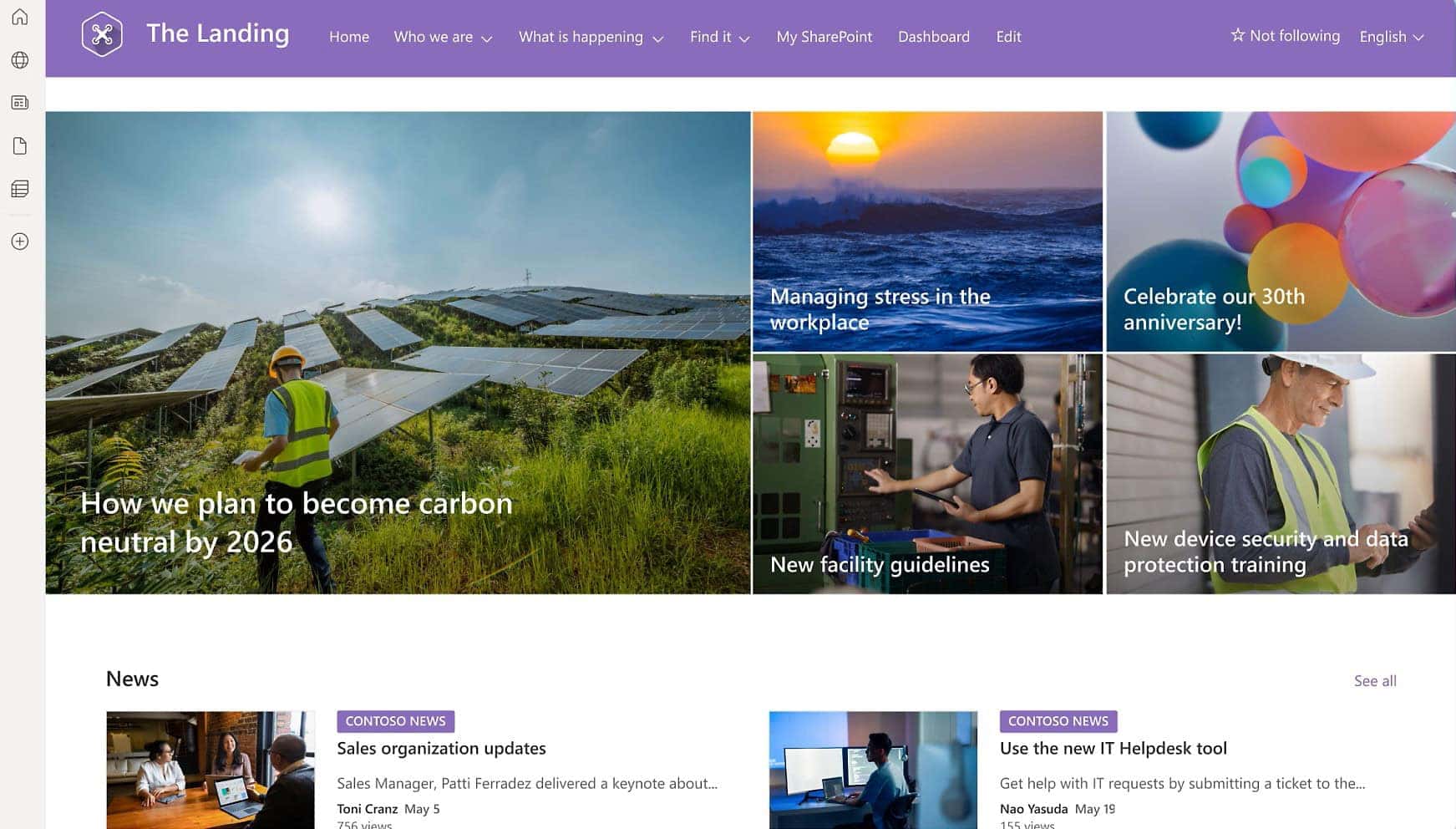
Viva Connections is a branded company homepage and gateway to workplace news, resources and tools. It can bring content from your SharePoint intranet into Microsoft Teams, presenting it through areas including news, a dashboard and useful resources.
For many organisations, SharePoint remains the home of trusted company information. It holds news, policies, guidance, departmental content and links to the tools employees need. The challenge is getting people there.
Employees don’t necessarily begin their working day by thinking, “I should visit the intranet.” They’re more likely to open Teams because that’s where their meetings, messages and everyday collaboration happen.
Connections gives them another route into the digital workplace from within Teams or on the web. An employee might use it to catch up on company news, find a policy or access a dashboard card for an everyday task. Microsoft gives examples such as clocking in for a shift, reviewing pay information or booking a shuttle, although the actions available will depend on how the organisation configures the experience.
For an internal comms team, this is useful because it makes intranet content easier to encounter during the working day. It can also help employees move from reading information to doing something with it, whether that means completing a form, opening an HR system or finding a relevant resource.
Connections doesn’t have to replace your SharePoint intranet. For organisations with an established intranet, it can act as a more accessible front door to the content, navigation and tools already there.
Viva Engage: Creating Space for Conversation & Community
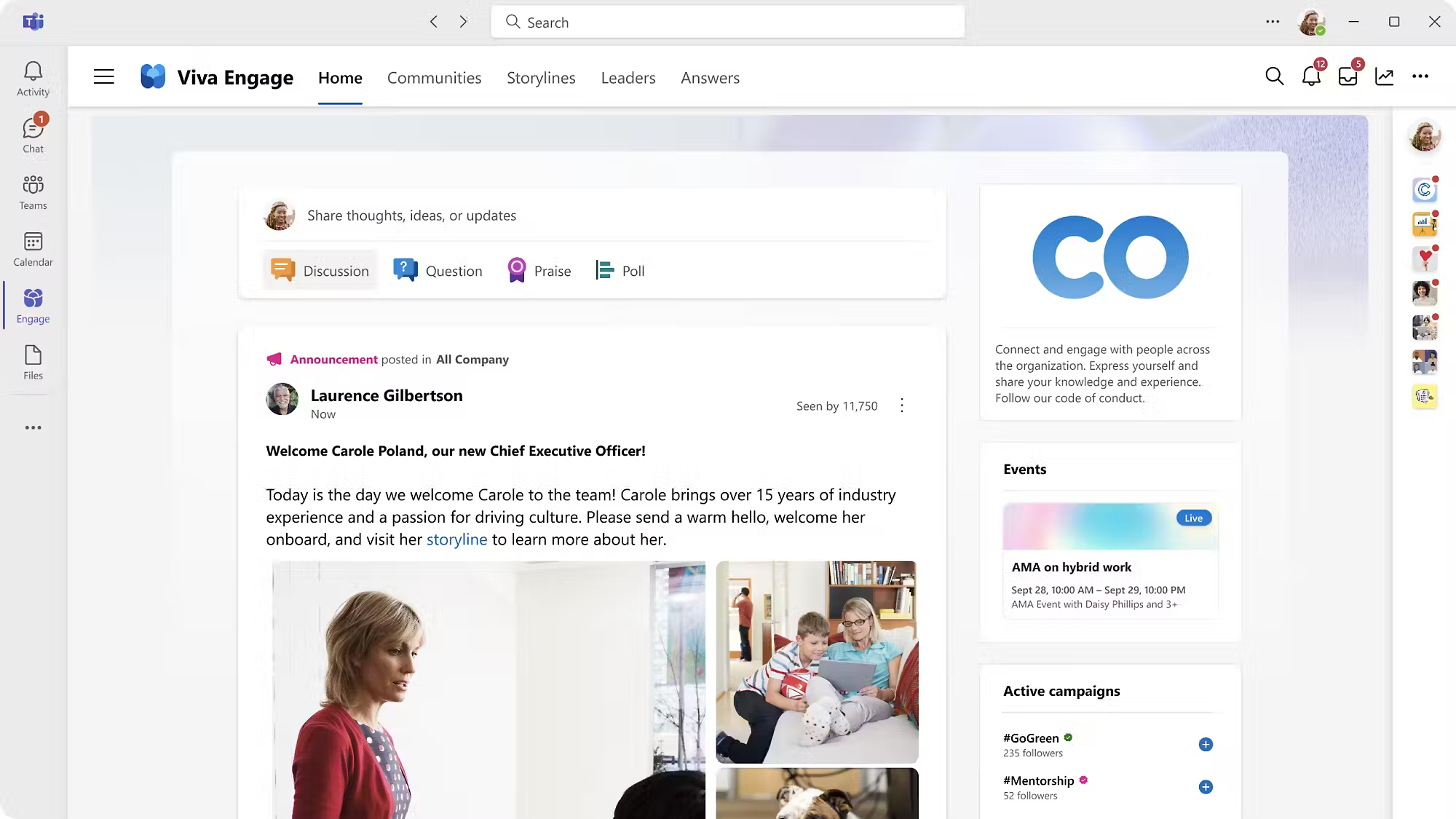
Viva Engage is Microsoft’s enterprise social network. It provides organisation-wide spaces where employees can join communities, share updates, ask questions, exchange knowledge and connect with leaders and colleagues. It can be accessed through Teams, on the web and through mobile experiences.
For internal communicators, Engage plays a different role from the intranet.
A SharePoint intranet is well suited to publishing trusted, structured information. It gives policies, formal updates and important resources a clear home. Engage provides the conversational layer around that information.
A leadership update, for example, doesn’t have to end when the announcement is published. Employees can respond, ask questions and see what their colleagues are thinking. Employee networks can create visible communities. Subject matter experts can answer questions outside their immediate team, allowing useful knowledge to remain available after the original conversation.
This can be particularly helpful when knowledge would otherwise disappear into an email chain or a private Teams chat. Answers in Viva allows employees to ask and answer questions, connect with subject matter experts and contribute to a wider organisational knowledge base.
Engage can also bring conversations closer to intranet content. Communities and discussions can be surfaced within SharePoint, helping an employee move naturally from reading an official article to seeing the questions and discussion around it. In previous Silicon Reef work, this has included embedding a Viva Engage Q&A feed on an intranet help page so that answers could accumulate for other employees to find.
Of course, opening a community doesn’t guarantee participation. Employees need a reason to join, community owners need a clear purpose, and leaders and administrators need to be visibly involved. Technology provides the space, but people determine whether the conversation becomes useful.
Viva Engage with Bauer Media Group
See what a real-life Viva Engage roll-out looks like at enterprise level with Bauer Media Group.
Viva Amplify: Managing Communications as Campaigns
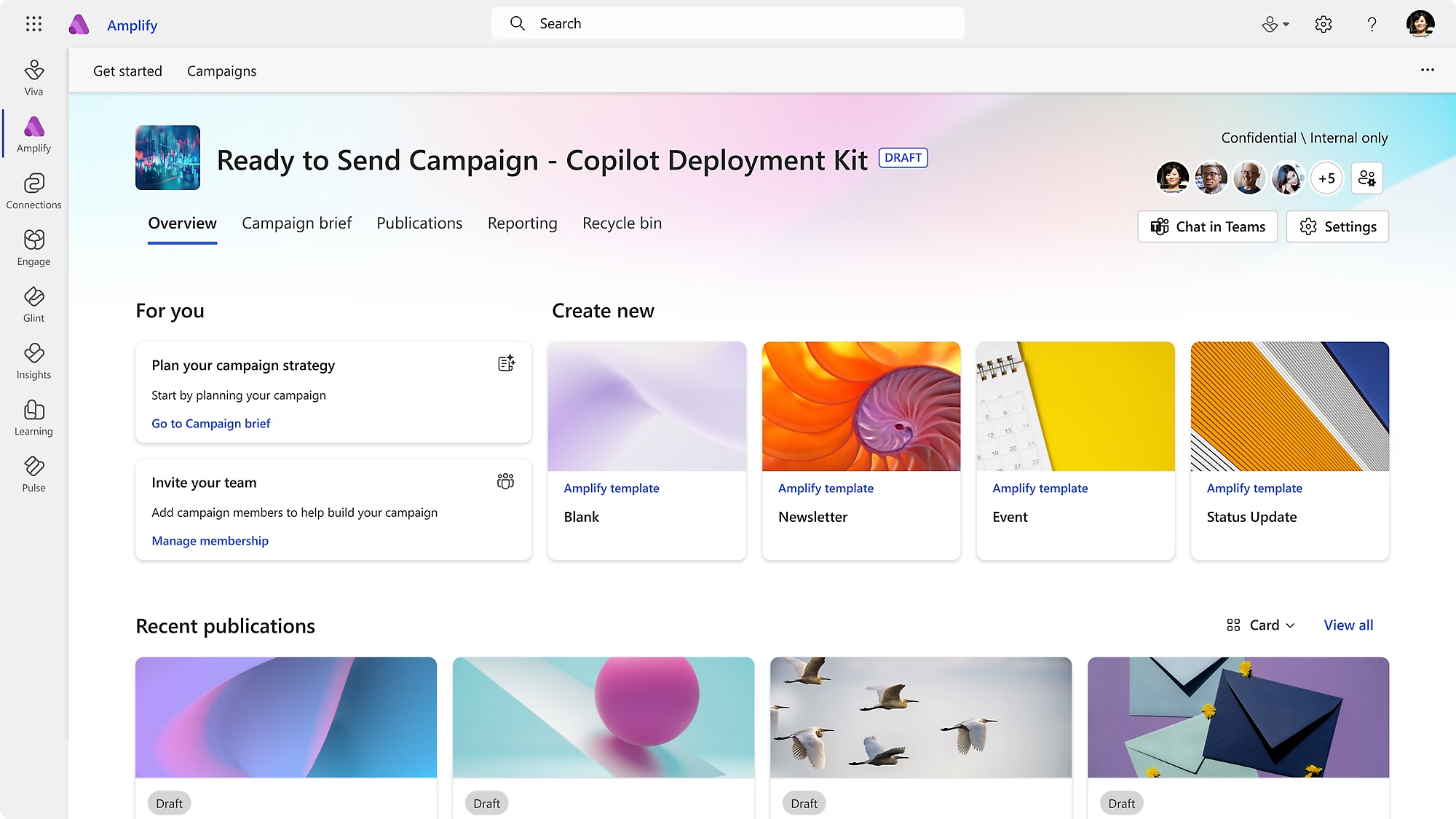
Viva Amplify is an internal communications application for managing campaigns. It brings campaign planning, content creation, publishing and reporting into one place, with support for distributing communications across Microsoft 365 channels including Outlook, Teams, SharePoint and Engage.
Creating a good piece of content is only part of an internal communicator’s job. You also need to decide where it should appear, who needs to see it, whether the format should change between channels and how you’ll judge its performance.
That becomes harder when employees consume information in different places.
Take the launch of a new organisational strategy. The campaign may include a detailed article on the SharePoint intranet, an email from the CEO, a shorter post in Teams and a conversation in Viva Engage. Without the right process, each item can become a separate publishing task, even though they all support the same objective.
Amplify gives the comms team a central campaign space. Communicators can create a campaign brief, collaborate with contributors, manage approvals, schedule publications and tailor content for the channels and audiences involved. Reporting then brings campaign and channel information back into that central view.
This doesn’t remove the need to think carefully about each channel. An intranet article and a Teams post shouldn’t necessarily use identical copy. Amplify gives you a more organised way to manage those differences while keeping the campaign connected.
It’s particularly relevant for change programmes, strategy launches, awareness campaigns and other communications that need to build understanding over time. Instead of publishing one announcement and hoping it lands, the comms team can manage the sequence as a campaign with a defined purpose.
How Viva Connections, Engage & Amplify Work Together
Connections, Engage and Amplify each have a distinct role, but employees shouldn’t need to understand the product boundaries between them.
Consider that new organisational strategy again. The internal comms team could use Amplify to plan the campaign and coordinate publications across Microsoft 365.
Employees might encounter the main announcement through the SharePoint intranet, accessed from Connections in Teams. They could then join a leadership conversation or ask questions in Engage.
From the employee’s perspective, this should feel like one communication experience. They receive the initial message, know where to find the detail and have somewhere to take part in the conversation.
This is more useful than asking people to navigate a collection of Microsoft products. It also allows the internal comms team to think about the whole employee journey, rather than treating the intranet, email, Teams and community channels as unrelated destinations.
The Communications and Communities package reflects this relationship by bringing together premium capabilities across Viva Connections, Viva Engage and Viva Amplify for organisations that want to develop this connected approach further.
Related reading
What About the Rest of Microsoft Viva?
Connections, Engage and Amplify are likely to be the main areas of interest for an internal comms team, but they aren’t the whole Viva story.
Viva Glint is an organisation-wide employee listening application. It uses surveys and recommended actions to help organisations understand employee feedback and identify where action may be needed. Viva Pulse provides a lighter way for managers and team leaders to ask for regular feedback from their teams.
Viva Insights focuses on working patterns, productivity and wellbeing. It includes private, personalised insights for employees as well as broader analytical capabilities for organisations, depending on the licences and experience being used.
Viva Learning brings learning content into Teams and the web. It can connect content from sources including Microsoft Learn, LinkedIn Learning, third-party providers, learning management systems and an organisation’s own resources. Employees can discover, share and recommend learning without having to begin their search in a separate training portal.
Ownership of these applications can vary. Employee listening often sits within internal comms, while learning, workplace insights and other Viva experiences may be owned more directly by HR, learning or workplace teams. Regardless of ownership, it should still create a joined up employee experience.
Employee listening should inform communication. Learning programmes need clear promotion and accessible content. Workplace insights may reveal patterns that affect how and when messages are delivered. Internal comms doesn’t need to own every Viva application, but it should be part of the conversation about how these experiences connect.
Do you Need Microsoft Viva if you Already Have a SharePoint Intranet?
One of the most common question we hear is whether Viva replaces the SharePoint intranet.
For most organisations, it’s more useful to think about how the two can complement one another.
SharePoint provides the content, structure and governance behind many modern intranets. Viva Connections can surface that experience in Teams and provide quicker routes to news, resources and workplace tools. Viva Engage can add communities and conversation around formal intranet content. Amplify can help the comms team coordinate how that content is shared across Microsoft 365.
Viva cannot compensate for weak foundations, though.
If the intranet is difficult to navigate, contains outdated content or has no clear ownership, bringing it into Teams won’t resolve those problems. Connections still needs useful information and well-designed employee journeys behind it. Engage communities need purpose and active management. Amplify campaigns need clear objectives and good content.
The same applies to information architecture and governance. If employees don’t know where trusted information belongs, adding more ways to surface it can create further confusion. Especially with Copilot now in the picture.
So does Viva replace your intranet? No. But your intranet does need to be in good shape to get the full Viva experience.
Creating a Useful Microsoft Viva Experience
There’s no single version of the Microsoft Viva experience that will suit every organisation.
A global business trying to connect employees across locations may see the greatest opportunity in Engage communities. An organisation with a well-established SharePoint intranet and a large front-line worker population may want to make content and everyday tasks more accessible through Connections. A busy internal comms function might begin with Amplify because it needs a more structured way to manage multi-channel campaigns.
In many organisations, the eventual experience will combine all three.
The important thing is to design around employees rather than the product catalogue. Look at how people currently receive information, where they ask questions and which routine tasks send them searching through several different systems. Those everyday situations will tell you more about where to begin than a long list of features.
When Viva is approached in that way, it becomes a useful part of the digital workplace rather than another destination layered on top of it. Employees get clearer routes to information, conversations and everyday actions through a more connected experience of SharePoint, Teams and Microsoft 365.
For internal comms teams, that means thinking less about individual channels and more about the experience those channels create together.
An Internal Communicator’s Guide to Microsoft Viva
Take a closer look at Viva Connections, Engage & Amplify, and how they come together to create an all-in-one internal comms platform inside Microsoft 365.