
Inclusive Design for Digital Workplaces
We create digital workplaces where every employee can connect, contribute and work to their best ability. Blending technical expertise, inclusive design, and compliance, we deliver accessible SharePoint solutions as well as consultancy workshops, audits, and tools.
With the introduction of the EU Accessibility Act, organisations are being called to build digital environments that work for everyone. Accessibility is no longer optional—it’s essential for compliance, reputation, and creating truly inclusive employee experiences. The result is a dynamic environment where navigation is seamless, communications are clear, and everyone – regardless of ability – benefits from an inclusive, compliant workspace.
Our Services
Our SharePoint accessibility audits provide a deep dive into how your digital spaces support inclusive experiences. Combining expert analysis with practical guidance, we help you uncover barriers and unlock opportunities for improvement. Our audits include:
- Comprehensive Page Reviews: We assess layout, structure, and content across representative pages to identify issues affecting readability, navigation, and user experience.
- Inclusive Design Checks: From heading hierarchy and list formatting to colour contrast and image accessibility, we evaluate how well your site supports diverse user needs.
- Real-World Testing: Using visual inspection, accessibility tools, and readability scoring, we simulate user journeys to highlight friction points and suggest actionable fixes.
- Tailored Recommendations: Receive clear, editor-friendly guidance on improving page templates, content structure, and media presentation—no code-level changes required.
- Accessibility Assistant Integration: We help your teams make the most of built-in Microsoft accessibility tools, ensuring ongoing compliance and ease of maintenance.
As award-winning SharePoint specialists, we design modern, accessible intranets that put people first. Using SharePoint’s native tools and our own design accelerator, Beacon, we build inclusive digital spaces where everyone can connect and contribute:
- Inclusive Intranet Builds: Employ best-in-class SharePoint components to create accessible and user-friendly sites.
- Collaborative Design Workshops: Shape intuitive navigation, structure, and engage employees at every level.
- UX-Led Homepage Takeovers & Templates: Deliver accessible, branded experiences for events and campaigns.
- Accessibility-First Design Principles: Implement high-contrast colours, alt text, and clear, readable layouts for all employees.
Our expert-led workshops help teams grasp accessibility in Microsoft 365 from both technical and human perspectives. Each session is tailored to the needs of your organisation, with formats including:
- Art of the Possible Sessions: Explore opportunities to weave accessibility throughout your digital workplace.
- Stakeholder Envisioning: Align teams and leaders on shared inclusion goals and outcomes.
- EU Accessibility Act Readiness: Navigate existing and upcoming legislation and ensure your digital estate is ready for compliance.
Start Designing Inclusive Digital Workplaces
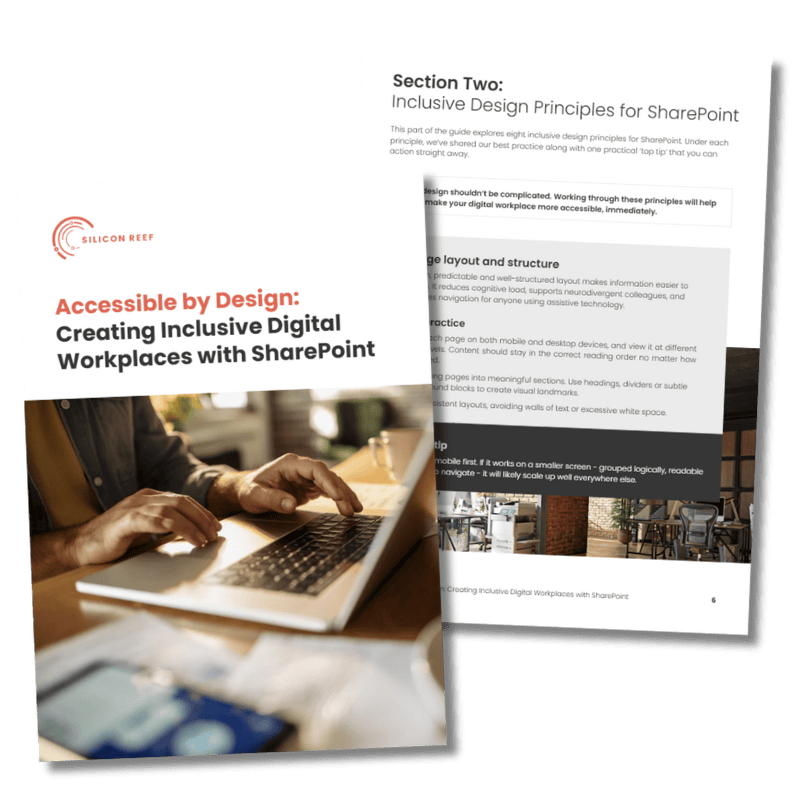
Our guide to accessible SharePoint design shares best practice, practical advice and insights from our accessibility experts.
Customer Spotlight: UK Centre for Ecology & Hydrology

We partnered with the UK Centre for Ecology & Hydrology (UKCEH) to audit their SharePoint intranet, The Hub. By reviewing 18 representative pages, we identified barriers to inclusive access and delivered practical, editor-friendly recommendations across layout, navigation, readability, and media use.
UKCEH can now enhance usability for all employees—without needing code-level changes—proving that thoughtful design drives meaningful inclusion.
What We Uncovered
Our team surfaced 66 actionable recommendations, each one an opportunity to build a more accessible intranet. Here’s a sample:
Clarify Heading Hierarchy
Spell Out Acronyms
Standardise Link Behaviour
Improve Colour Contrast
Thoughtful adjustment of brand colours meets WCAG guidelines and reduces visual strain for neurodiverse users.
Create Consistent Page Templates
Use Emojis With Care
Why Clients Choose Silicon Reef
Microsoft Modern Work Partner for Enterprise and SMBs: Trusted experts in delivering modern digital workplaces through Microsoft 365 for organisations of every size.
Prince II & Agile-certified project management: Combining structure and flexibility to deliver projects efficiently and with complete transparency.
Award-winning UX & digital workplace design: Recognised for creating intuitive, engaging experiences that empower employees to do their best work.
Inclusive culture and sustainability at our core: Driven by values of inclusion and sustainability, we design solutions that make a lasting positive impact.
Creating Accessible Workplaces Together

Accessibility Q&A
Kate Molloy, our UX Lead and Accessibility Champion, discusses why accessibility is important, some practice advice, and lessons learnt from working on accessibile digital workplaces with our clients.

FAQs
Got questions? We’ve answered some of the common ones here. If you can’t find what you’re looking for, drop us a note.
How does SharePoint support accessibility for all users?
SharePoint supports accessibility through features like screen reader compatibility, keyboard navigation, high-contrast modes, and text-to-speech tools. These capabilities help people of all abilities navigate and contribute to intranet content. At Silicon Reef, we combine these native features with inclusive design practices and tools like Beacon, which makes it easier to create on-brand, accessible designs that enhance usability for all employees.
What accessibility standards should Microsoft 365 environments meet?
Microsoft 365 environments should comply with recognised standards such as WCAG and the EU Accessibility Act, which define how digital content must be perceivable, operable, understandable, and robust. Silicon Reef supports organisations in meeting these standards through consultancy, audits, workshops, and M365 solutions which helps teams maintain consistent, accessible, and branded design patterns across SharePoint.
Why is accessibility important in digital workplace design?
Accessibility ensures that every employee, regardless of ability, can engage fully with digital tools and information. Beyond compliance, it’s about creating equitable, human-centred experiences that drive productivity and belonging. Silicon Reef combines technical expertise, inclusive design, and accessibility tools to help organisations deliver intranets and digital workplaces that are intuitive, visually cohesive, and accessible to all users.
How does Silicon Reef help organisations improve accessibility in SharePoint and Microsoft 365?
Silicon Reef helps organisations improve accessibility by providing consultancy, audits, and inclusive design services tailored to SharePoint and Microsoft 365. Our team identifies accessibility gaps, optimises navigation and content structure, and implements practical solutions — from UX-led templates to accessibility overlays. With Beacon, we make it easier to produce designs that are on-brand, user-friendly, and aligned with accessibility best practices, helping employees engage confidently with their digital workplace.
Ready to create a more inclusive workplace?
Send us a message to talk about your accessibility needs.