Here’s a familiar scene: you’re scrolling through your SharePoint intranet and discover yet another abandoned site. The one from the initiative that finished three years ago. No one’s bothered to retire it. Then there’s the content that’s supposed to be updated quarterly—except it hasn’t been touched since 2022. The broken links? Don’t even get me started. And somewhere in a library that “nobody knows who owns anymore,” there’s a folder hierarchy so convoluted that nobody can find anything.
Sound familiar? You’re not alone. Governance becomes a nightmare that keeps many internal communicators awake at night—not because they don’t care, but because SharePoint governance, as currently practised, demands constant vigilance, deep technical knowledge, and time that most IC teams simply don’t have
There’s a particular kind of exhaustion that comes with managing SharePoint at scale. It’s not dramatic. It’s just death by a thousand paper cuts. A broken link here. Stale content there. A permissions tangle nobody can untangle. And every single issue feels like something you should’ve caught, something you could’ve prevented if only you had more time, more resources, or more of a clue about how SharePoint actually works.
I’ve seen this wear down good communicators—the kind who care deeply about doing their job well but find themselves trapped in governance busywork instead.
This is where SharePoint Knowledge Agent changes things.
If you haven’t heard of it yet, Knowledge Agent just entered public preview in September 2025. It’s an AI-powered assistant built directly into SharePoint, designed to tackle the exact problems that make governance such a headache: stale content, broken links, permissions chaos, and the soul-destroying task of manually tagging and organising documents.
Let me walk you through what it actually is, why it matters, and what it might mean for how you work.
What is SharePoint Knowledge Agent?
Understanding AI-Powered Content Governance
Knowledge Agent sits inside SharePoint as a floating button in the bottom right corner. Click it, and you get context-aware options tailored to what you’re actually doing right now:
- Creating a page? It’ll draft one and suggest layouts
- Need to understand what’s in a document? Summarise it in seconds
- Found a broken link? Fix it
- Want to ask a question about your content? It gives you grounded answers based on what’s actually in your library.
The clever bit is that it uses natural language. You don’t need to be a SharePoint power user or an IT expert. You tell it what you need in plain English, and it figures out the rest.
“Fix all the broken links on this site.”
“Create a view showing policies expiring in the next 12 months.”
“Retire the outdated pages that nobody’s visited in six months.”
That’s it.
It’s the kind of tool that sounds almost too simple to be useful until you realise how much of your day is spent doing exactly these things manually.
How Knowledge Agent Solves SharePoint Governance Challenges for Internal Comms Teams
Remember the three main governance pain points that plague internal communicators? Knowledge Agent takes them on directly.
Tackling Stale Content and Broken Links: The Trust Problem
Your intranet is only trustworthy if employees believe the information is current and accurate. The moment they find outdated policies or broken links, you’ve lost them. They stop coming back. They stop trusting you.
The problem isn’t laziness or neglect. It’s that manually hunting down and fixing every broken link, every outdated page, every duplicate feels impossible. By the time you’ve fixed one problem, three new ones have appeared. It’s like trying to bail out a boat that’s got holes you can’t quite locate.
Knowledge Agent watches your site usage patterns—where employees are clicking, what they’re searching for, which pages they’re visiting. Then it automatically:
- Flags content that’s gone stale
- Fixes broken links
- Identifies content gaps based on actual user behaviour
You don’t have to guess or manually audit anymore
I see this pattern across enterprise organisations constantly: sprawling SharePoint estates with thousands of sites that have accumulated over years with no real governance. Nobody knows what’s in them, who owns them, or whether permissions are still correct. It’s not incompetence—it’s just what happens when growth outpaces structure. Knowledge Agent offers a way to systematically identify, clean up, and organise what actually matters

Fixing Metadata and Organisation Chaos: The Ownership Problem
Here’s a scenario that probably feels painfully familiar: you inherit a sprawling intranet where HR, Finance, Marketing, and Operations all have their own SharePoint sites. Nobody’s quite sure what’s in each one, who’s responsible for keeping it fresh, or why some folders are organised by date, others by department, and a few by seemingly random naming conventions.
The usual approach? Internal comms becomes the governance police, trying to wrangle everyone else’s content. It’s a losing battle. I’ve watched this play out in organisation after organisation—communicators stretched too thin, trying to maintain standards across sites they don’t own and can’t control.
Knowledge Agent flips this.
It empowers individual departments to self-manage their own sites without needing to understand the technical side. Rather than you policing governance across the entire intranet:
- Marketing can tell Knowledge Agent: “Keep our announcements organised by campaign and date, and flag anything that hasn’t been updated in three months”
- Finance can request: “Auto-tag all our budget documents with department and fiscal year, then notify me of anything expiring soon”
- Operations can set up: automatic metadata organisation, custom views, and governance alerts—all without touching IT
Departments are maintaining their own governance standards because Knowledge Agent makes it simple—no IT queue, no technical expertise needed.
And here’s the bonus: once your content is properly organised with consistent metadata across departments, it becomes infinitely better for Copilot and other AI tools. Better-structured information means better answers. It’s not just nice organisation—it’s strategic.
Reducing IT Dependency: The Speed Problem
One of the biggest frustrations internal communicators describe is having to rely on IT for every little thing. Need a workflow? Ask IT. Want to create a new view of your library? Ask IT. Want to set up an automation that emails you when new invoices arrive? You guessed it—ask IT.
This isn’t IT being awkward. It’s that SharePoint has been designed with a heavy technical weight. And IC teams are small, stretched, and don’t have the luxury of hiring a dedicated SharePoint admin.
Knowledge Agent changes this fundamentally. It has specific capabilities designed to put power back in your hands:
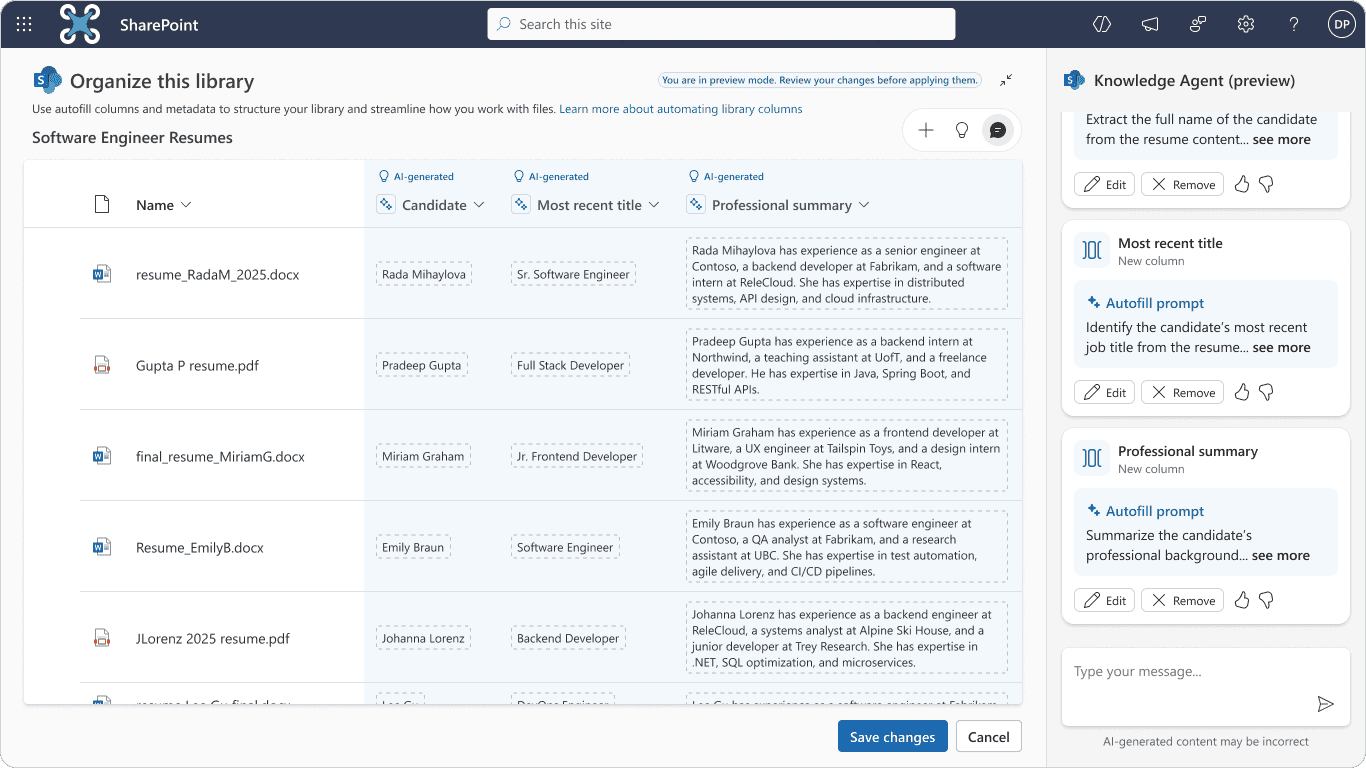
- Organise libraries with auto-filled metadata—no manual tagging
- Set up rules using natural language—describe what you need and Knowledge Agent builds it
- Create new views that automatically sort and filter your content (e.g., “show me all pages nobody’s visited in six months”)
- Improve your site by fixing broken links, retiring outdated pages, and identifying content gaps based on actual user behaviour
None of this requires IT. You’re describing what you need in plain English, and Knowledge Agent handles the technical complexity behind the scenes.
This shifts the power back to the people actually using the platform—content creators, site managers, communicators. It means you’re not waiting in IT’s queue for help. You’re getting things done.
Why SharePoint Knowledge Agent Matters for Internal Communications Strategy
I’ll be honest: Knowledge Agent isn’t a magic fix for all SharePoint problems. You still need to think about your overall content strategy. You still need site owners who care about maintaining their spaces. You still need some level of governance that sits with both IC and IT, working together.
But it radically reduces the friction. It takes the soul-destroying admin work off your plate. And it frees you up to do what you actually went into internal communications to do: strategise, connect with people, tell stories that matter, measure impact.
Instead of spending your Wednesday afternoon hunting down broken links and pestering IT for permissions, you’re spending it thinking about your annual engagement campaign or digging into why certain messages aren’t landing. You’re doing strategic work, not governance busywork.
For organisations with sprawling intranets, Knowledge Agent offers a path forward. It won’t instantly fix years of neglect, but it gives you the tools to systematically clean things up, organise systematically, and—crucially—distribute responsibility so governance isn’t always falling on your shoulders
Knowledge Agent Limitations: What You Should Know Before Adopting
Knowledge Agent is currently in public preview and requires a Microsoft 365 Copilot licence. That means it’s not quite ready for everyone yet, and there’s a cost consideration. Your organisation will need to have already made the investment in Copilot.
It’s also not—despite what some marketing material might suggest—a complete knowledge management solution…yet. But watch this space. It works best when you’re already thinking about governance as a shared responsibility between IC and IT. And it works within the boundaries of individual sites and libraries, so you’ll still need a broader governance strategy for your entire intranet.
But for internal communicators drowning in governance overhead, it’s worth exploring. It’s a tool built with you in mind, not against you.
Getting Started with SharePoint Knowledge Agent: Next Steps for Your Team
If this sounds like it could help your organisation, have a conversation with your IT team. Talk through use cases. Look at the areas where governance is costing you the most time and where Knowledge Agent could make the biggest difference.
And remember: the best governance approach is one that doesn’t require a dedicated team to maintain. Knowledge Agent moves us closer to that reality—a SharePoint experience where keeping things fresh, organised, and trustworthy feels less like a burden and more like business as usual.
If Knowledge Agent is one step toward a cleaner, smarter intranet, the next is fixing the foundations it sits on.
Dive into our Fixing a Broken Digital Workplace guide to uncover where disconnection starts — and how to rebuild better.