
Overview
Powering Custom SharePoint Experiences
Bespoke SharePoint solutions require more than out-of-the-box functionality—they need the right tools to deliver speed, flexibility, and scale.
By using a mix of development frameworks, low-code platforms, cloud services, and APIs, we create solutions that integrate seamlessly, automate workflows, and enhance collaboration across your organisation. These tools help turn SharePoint into a dynamic platform that supports modern business needs while remaining secure, maintainable, and adaptable as requirements evolve.
What it is: SPFx is a client-side development framework for building custom web parts, extensions, and enhancements in modern SharePoint Online environments.
Why it’s useful: SPFx allows organisations to extend SharePoint in a responsive, mobile-friendly way, fully integrated with Microsoft 365. It’s ideal for modernising legacy solutions, injecting consistent UI elements, or creating interactive, data-driven components.
Common use cases:
- Custom Web Parts & Dashboards: Build interactive dashboards, employee directories, or department-specific feeds that pull data from SharePoint or external systems.
- Application & Field Customisers: Add consistent site-wide navigation, banners, alerts, and enhance lists or libraries with visual cues and conditional formatting.
- Modernising Legacy Solutions: Replace classic web parts, JSLink customisations, or InfoPath forms with modern, responsive alternatives that improve usability and maintainability.
Impact: SPFx empowers teams to make SharePoint work the way they need—improving productivity, engagement, and future-proofing digital workplaces.
What it is: A suite of low-code tools—Power Automate, Power Apps, and Power BI—designed to automate workflows, build custom apps, and visualise data.
Why it’s useful: Power Platform enables rapid delivery of business solutions without heavy coding, while integrating seamlessly with SharePoint and Microsoft 365. It’s ideal for organisations looking to streamline processes and gain actionable insights from their data.
Common use cases:
- Automated Workflows: Simplify approvals, document routing, or recurring operational tasks, reducing manual effort.
- Custom Business Apps: Build solutions for compliance tracking, resource booking, or event management.
- Data Visualisation & Insights: Create interactive dashboards in Power BI to surface real-time SharePoint data for better decision-making.
Impact: Power Platform helps teams work smarter, not harder, turning SharePoint into a hub for automated, data-driven processes.
What it is: Microsoft’s cloud platform offering services for hosting, databases, identity management, and more.
Why it’s useful: Azure underpins secure, scalable, and high-performance SharePoint integrations. It’s essential when working with large datasets, external systems, or complex organisational requirements.
Common use cases:
- Backend Services: Host functions, databases, and microservices to extend SharePoint capabilities.
- Secure Access & Identity Management: Control user permissions and content targeting using Azure Active Directory.
- Integration & Scalability: Enable APIs and services that connect SharePoint with other business systems.
Impact: Azure ensures SharePoint solutions are reliable, secure, and capable of handling enterprise-scale workloads without compromise.
What it is: APIs (Application Programming Interfaces) allow different systems to communicate and exchange data seamlessly.
Why it’s useful: API integrations extend SharePoint’s capabilities by connecting it with third-party platforms, legacy systems, or other Microsoft 365 services—bridging gaps between tools and workflows.
Common use cases:
- Third-Party Connectivity: Integrate platforms like DocuSign, Adobe Sign, or CRM systems for streamlined processes.
- Data Synchronisation: Enable real-time exchange between SharePoint and external databases or applications.
- Enhanced Productivity: Use Microsoft Graph API to automate tasks and surface relevant data across SharePoint and Microsoft 365.
Impact: API integrations turn SharePoint into a connected, centralised platform, ensuring data flows efficiently and teams have the information they need, when they need it.
Leaders Trust Silicon Reef


















A Unified Digital Workplace
Streamlined Processes Across Systems
Better Data Insights
Scalable Collaboration
Future-Proof Flexibility
More Value from Microsoft 365
Treat M365 as a connected platform, not separate apps, to realise its full potential.
Client Stories

7 Day Intranet Transformation
A brand-aligned design refresh for financial services firm TP ICAP.

Empowering Higher Education Comms
A new branded intranet with custom page templates for the University of Leeds.
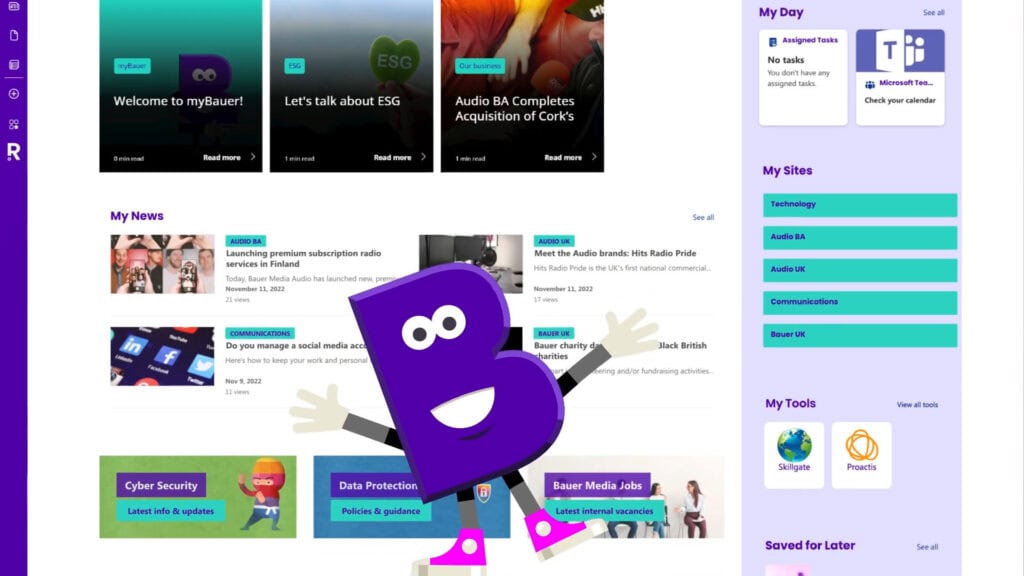
Bauer Media Group set out to create a personalised intranet experience that truly works for every employee.
In this 60 second overview, see how we brought that vision to life using SharePoint and Beacon.
Video created by our friends at The Surgery
Let’s Talk Development
Whatever your SharePoint project, we’ll find the development tools to suit you.
FAQs
Got questions? We’ve answered some of the common ones here. If you can’t find what you’re looking for, drop us a note.
How do I know which SharePoint development tools to use?
The right tool depends on your goals, complexity, and scale. SPFx is ideal for responsive, custom web parts and UI enhancements. Power Platform works well for low-code apps and automated workflows, while Azure supports heavy integrations or large datasets. APIs extend connectivity to other systems.
At Silicon Reef, we focus on selecting tools that deliver lasting value and integrate smoothly with Microsoft 365, rather than building solutions that are overly complex or hard to maintain.
Can we extend SharePoint without heavy coding?
Yes. Tools like Power Apps and Power Automate allow teams to create apps, automate workflows, and surface insights without extensive developer resources. These tools integrate closely with SharePoint and M365, helping organisations get results quickly.
Silicon Reef often combines low-code approaches with SPFx components to deliver solutions that are both practical and scalable.
How do these tools improve collaboration across my organisation?
At Silicon Reef, we design solutions so the technology enhances collaboration rather than creating more complexity.
Are these tools suitable for both small and large organisations?
Absolutely. SPFx, Power Platform, Azure, and APIs can be tailored to suit teams of any size. Small teams can quickly build dashboards or automate processes, while enterprise organisations can manage complex integrations and governance.
Silicon Reef focuses on solutions that scale effectively, ensuring organisations get value now and in the future.
How do these tools help future-proof SharePoint?
Modern development tools align with Microsoft’s roadmap and ongoing updates. SPFx replaces older customisations, Power Platform enables agile innovation, and Azure/API integrations support evolving business needs.
Silicon Reef designs solutions that remain flexible and adaptable, helping organisations maintain a digital workplace that grows with their requirements.
Send us a message
We help organisations of all shapes and sizes elevate their digital employee experience with Microsoft 365 — from intranets and document management to workflow automation and AI. Tell us about your goals, and we’ll help you get there.